
Table of Contents
This article demonstrates how to publish snapshot events with AG-UI and Microsoft Agent Framework (MAF).
One of the most important principles of building agentic applications is providing the user with feedback on the state and progress of the system. This becomes even more critical when you start running remote workflows which can take time to execute and return results.
If you treat your tools, agents or workflows as a black box, then the user will have to watch a spinner while the system executes their task. This is a poor experience for the user and only gets worse as you add features to your application.
One approach to providing intermediate feedback to the UI is to leverage AG-UI state snapshot updates.
So let’s take a look on how to do this…
How AG-UI Maps Agent Events
The current AG-UI extension method provided with the Microsoft Agent Framework maps your route to your AIAgent. It then executes your agent and converts the responses to AG-UI events (AsAGUIEventStreamAsync).
public static class AGUIEndpointRouteBuilderExtensions
{
    /// <summary>
    /// Maps an AG-UI agent endpoint.
    /// </summary>
    /// <param name="endpoints">The endpoint route builder.</param>
    /// <param name="pattern">The URL pattern for the endpoint.</param>
    /// <param name="aiAgent">The agent instance.</param>
    /// <returns>An <see cref="IEndpointConventionBuilder"/> for the mapped endpoint.</returns>
    public static IEndpointConventionBuilder MapAGUI(
        this IEndpointRouteBuilder endpoints,
        [StringSyntax("route")] string pattern,
        AIAgent aiAgent)
    {
        return endpoints.MapPost(pattern, async ([FromBody] RunAgentInput? input, HttpContext context, CancellationToken cancellationToken) =>
        {
            if (input is null)
            {
                return Results.BadRequest();
            }

            var jsonOptions = context.RequestServices.GetRequiredService<IOptions<Microsoft.AspNetCore.Http.Json.JsonOptions>>();
            var jsonSerializerOptions = jsonOptions.Value.SerializerOptions;

            var messages = input.Messages.AsChatMessages(jsonSerializerOptions);
            var clientTools = input.Tools?.AsAITools().ToList();

            // Create run options with AG-UI context in AdditionalProperties
            var runOptions = new ChatClientAgentRunOptions
            {
                ChatOptions = new ChatOptions
                {
                    Tools = clientTools,
                    AdditionalProperties = new AdditionalPropertiesDictionary
                    {
                        ["ag_ui_state"] = input.State,
                        ["ag_ui_context"] = input.Context?.Select(c => new KeyValuePair<string, string>(c.Description, c.Value)).ToArray(),
                        ["ag_ui_forwarded_properties"] = input.ForwardedProperties,
                        ["ag_ui_thread_id"] = input.ThreadId,
                        ["ag_ui_run_id"] = input.RunId
                    }
                }
            };

            // Run the agent and convert to AG-UI events
            var events = aiAgent.RunStreamingAsync(
                messages,
                options: runOptions,
                cancellationToken: cancellationToken)
                .AsChatResponseUpdatesAsync()
                .FilterServerToolsFromMixedToolInvocationsAsync(clientTools, cancellationToken)
                .AsAGUIEventStreamAsync(
                    input.ThreadId,
                    input.RunId,
                    jsonSerializerOptions,
                    cancellationToken);

            var sseLogger = context.RequestServices.GetRequiredService<ILogger<AGUIServerSentEventsResult>>();
            return new AGUIServerSentEventsResult(events, sseLogger);
        });
    }
}
This extension allows you to expose a MAF agent via an endpoint and start communicating with it using the AG-UI protocol. But’s it’s also very restrictive in terms of what you can stream back to the user. You are limited to the output of the LLM call wrapped by your agent.
But what happens if you want to send a custom status or state update?
Understanding the AG-UI State Snapshot
The AsAGUIEventStreamAsync (Microsoft.Agents.AI.AGUI.Shared) extension method takes the events coming from your LLM and maps then to the corresponding AG-UI equivalent.
If you run the sample application, call the endpoint, and observe the output, you will see the event stream :
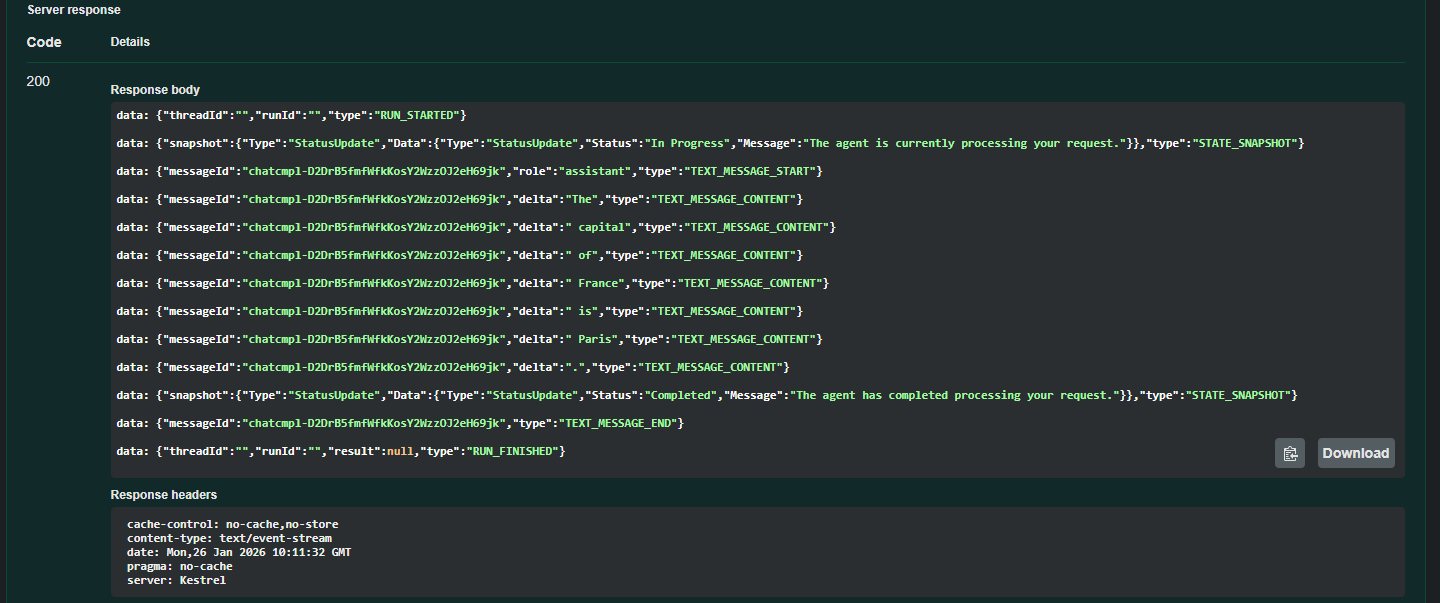
This is the code that takes a streamed chunk response and maps it to a TEXT_MESSAGE_CONTENT AGUI Event (visible in the screenshot above).
// Emit text content if present
if (chatResponse is { Contents.Count: > 0 } && chatResponse.Contents[0] is TextContent textContent && !string.IsNullOrEmpty(textContent.Text))
{
	yield return new TextMessageContentEvent
    {
        MessageId = chatResponse.MessageId!,
        Delta = textContent.Text
    };
}
The full code example handles mapping for text, tools and data content to AG-UI. This means if we want to send our own status updates back to the UI, we can include DataContent to the response messages.
When DataContent is added to the response with a JSON media type, the AG-UI extension converts it into a STATE_SNAPSHOT event, so we can distinguish it from other streaming events.
  private static readonly MediaTypeHeaderValue? s_json = new("application/json");

  if (content is DataContent dataContent)
  {
      if (MediaTypeHeaderValue.TryParse(dataContent.MediaType, out var mediaType)
			       && mediaType.Equals(s_json))
      {
          // State snapshot event
          yield return new StateSnapshotEvent
          {
              Snapshot = (JsonElement?)JsonSerializer.Deserialize(
              dataContent.Data.Span,
              jsonSerializerOptions.GetTypeInfo(typeof(JsonElement)))
          };
      }
This leads to another problem we must solve.
How do we publish intermediate data content into the Agent/LLM asynchronous stream?
Keep in mind that with Server-Sent-Events (SSE) the connection is only open as long as there are events to be enumerated. To publish a custom event we need to be inside the enumeration loop.
Leveraging the MAF Delegating Agent
Microsoft provides an abstract class called DelegatingAgent that is designed for extensibility and customization.
We can now create our own custom agent, override it methods, and most importantly, execute our own code inside the asynchronous streaming loop.
public class AGUIAgent(AIAgent agent) : DelegatingAIAgent(agent)
{
    private const string InProgress = "In Progress";
    private const string Completed = "Completed";
    private const string AgentProcessingRequest = "The agent is currently processing your request.";
    private const string AgentCompletedRequest = "The agent has completed processing your request.";

    protected override async IAsyncEnumerable<AgentResponseUpdate> RunCoreStreamingAsync(
        IEnumerable<ChatMessage> messages,
        AgentThread? thread = null,
        AgentRunOptions? options = null,
        [EnumeratorCancellation] CancellationToken cancellationToken = default)
    {

        yield return AGUIExtensions.CreateStatusSnapshotUpdate(InProgress, AgentProcessingRequest);

        await foreach(var agentResponse in base.RunCoreStreamingAsync(messages, thread, options, cancellationToken))
        {
            yield return agentResponse;
        }

        yield return AGUIExtensions.CreateStatusSnapshotUpdate(Completed, AgentCompletedRequest);
    }
}
The code sample shows how to publish a custom event before and after the LLM execution. As long as we yield updates inside the RunCoreStreamingAsync enumeration, the response will be returned via the SSE open connection to the UI.
And this is the AG-UI Extension class to create the events:
public static class AGUIExtensions
{
    private const string ApplicationJsonMediaType = "application/json";


    public static AgentResponseUpdate CreateStatusSnapshotUpdate(string status, string message)
    {
        var statusUpdate = new AGUIStatusUpdate(status, message);

        var stateBytes = JsonSerializer.SerializeToUtf8Bytes(
            new AGUISnapshot<AGUIStatusUpdate>(statusUpdate.Type, statusUpdate));

        return new AgentResponseUpdate
        {
            Contents = [new DataContent(stateBytes, ApplicationJsonMediaType)]
        };
    }
}
Until Next Time
Leveraging the DelegatingAgent pattern together with structured snapshot classes allows us to break open the “black box” of agent execution.
This approach enables rich, strongly typed intermediate feedback that significantly improves the responsiveness, transparency, and overall experience of agentic applications.
You can find the code sample here